


Description
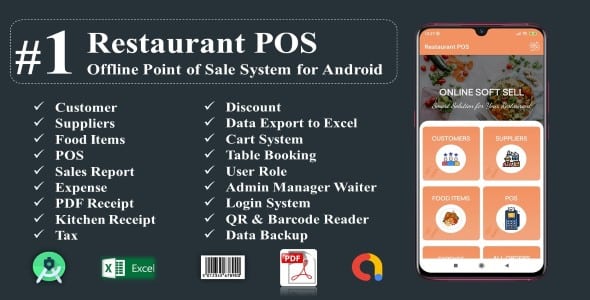
Restaurant POS is a very useful offline point of sale application for android mobile/tablet device. By using Restaurant POS, you can easily maintain your all kinds of items and sales records of restaurants. You can store customer and supplier’s information. You can easily see your daily, monthly and yearly reports with bar chart and export data on Excel sheet. There is login system and three types of user role-Admin, Manager and Waiter. You can print receipt for customers and kitchen via Wi-Fi or Bluetooth printers. You can add tax percentage and table booking for customers. Restaurant POS has multiple language (English, Spanish, Bangla, French) facility. Also, there is backup facility. You can back up your database and save it to device storage and you can import it. You can manage your restaurant sells smartly.
Restaurant POS Restaurant POS Restaurant POS Restaurant POS
Watch Demo Video on Youtube
Restaurant POS Demo
MAIN FEATURES:
Create customers and suppliers information.
Create items information with image.
Edit items information
Generate PDF receipt for customer
Generate PDF receipt for kitchen
Print PDF receipt by POS printer
Bluetooth and WiFi priter supported
Share PDF receipt to customers
Open PDF receipt by external PDF readers
Add items using QR code
Add itmes using Barcode code
Search items using QR and Barcode
Point of sales system with cart.
Order status-Pending,Completed and Cancel
Tax facility
Discount facility
Table Booking System
Create expense list.
Add/Edit items category
Add/Edit payment method
Daily,monthly and yearly report with bar chart
Database backup and restore system.
Databse backup into Google Drive
Databse import from Google Drive
Add any currency symbol
Attractive User Interface.
Import product data from Excel(xls) file
Export product data into Excel(xls) file
Import customers and suppliers data from Excel (xls) file
Export customers and suppliers data into Excel
Export all sales data into Excel file
Export all expense data into Excel file
Export full database into Excel
Multiple language (English,French,Spanish and Bangla) supported.
Android 10 compatible
Android Tablet Device supported
Google AdMob Integrated
Banner Ads and Interstitial Ads
Programmed in Android Studio IDE
Development language is Java
Enhanced documentation.
Default Admin Login Information
Phone Number:123456
Password: 1234
DEMO APK
RestaurantPOSDemoApk
Google AdMob Ads Integrated
Smart POS
What You Get
Full Android Source Code
APK File
Database File
Full Documentation with Screenshot
* Please test demo before purchase. We don’t provide any free support after purchase.*
Source And Credit:
I AM HAPPY TO CREDIT THE BELOW
Flat Icon
FreePic
Android Studio
Thanks for purchasing! Please Give Us 5 Star Rating!
Your Review & Ratings motivate us for more creative work
SUPPORT
If you need any support, please send us an email using the contact form user page. We usually respond to support requests within few hours. So please feel free to contact with us. Thank you.
CHANGELOGS
V 1.0 : 3 June , 2020
* First version release
V 2.0 : 17th August, 2020
* Add order status-Pending,Completed and Cancel
* Added Thermal printing support
* Data backup into Google Drive
* Data import from Google Drive
* Report Updated
V 2.1 : 10th October, 2020
* Decimal value problem solved
* Minor UI Update
* Minor bug fixed





![WallUp | Android Social Wallpapers Application [XServer]](https://premiumscripts.net/wp-content/uploads/2021/08/WallUp-Android-Social-Wallpapers-Application-XServer-350x178.jpg)

There are no reviews yet.